

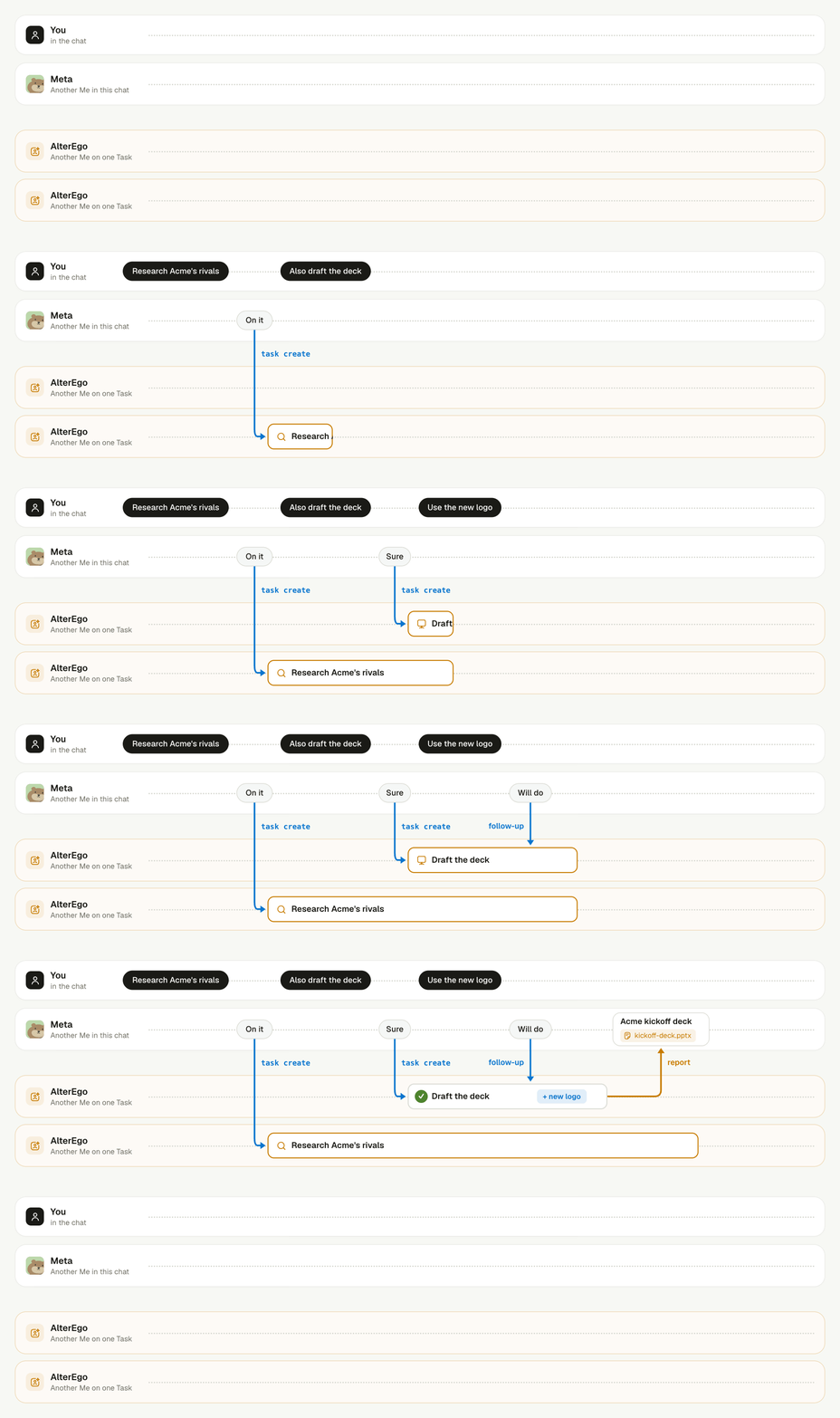
Two Tasks run side by side while the chat goes on.
What do you see while a Task runs?
The agent keeps talking, a line above the message box counts its running Tasks, and each result arrives as a card.- A short reply. The agent says in a line that the work is under way, then answers your next message as usual.
- The background line. Above the message box, a line reads “2 tasks running in the background”. Open it to see each Task’s name and how long it has run. The line disappears when no Task is running.
- A progress update. When a Task runs long and the agent goes quiet, the agent posts a short update on its own. See how the agent keeps you posted.
- Approval cards. A Task that needs your approval, for example before it sends mail, posts a card and waits. The card appears in the Room, or in your direct chat with the agent when you are not in that Room. A card that nobody answers expires after 10 minutes. See Approvals and permission review.
- The result. When a Task finishes, the agent posts a card with a short summary and the files. When a Task fails or needs your decision, the agent tells you in a message instead.
How do the Meta and the AlterEgo work together?
The Meta owns the conversation, and each AlterEgo owns one job. They hand work to each other through the server, never through your chat.- Start. The Meta runs
teamhub task createwith a name and a brief. The AlterEgo starts in its own session and workspace on the same computer. It never sees the chat, so the brief must carry everything it needs. - Work. The AlterEgo works in the background. It cannot post in the Room or ask you anything, because Linger blocks those commands inside a Task. A question goes into its report instead.
- Report. When a turn ends, its last reply goes privately to the Meta as a report. No one else sees it. When the turn fails, the Meta gets the error.
- Deliver. The Meta reads the Task’s files and decides what the Room needs: a card with the result, a question for you, or nothing.
playground/<task-id>/, and the same folder appears in the Meta’s workspace, so the Meta can read the outputs while the Task still runs.
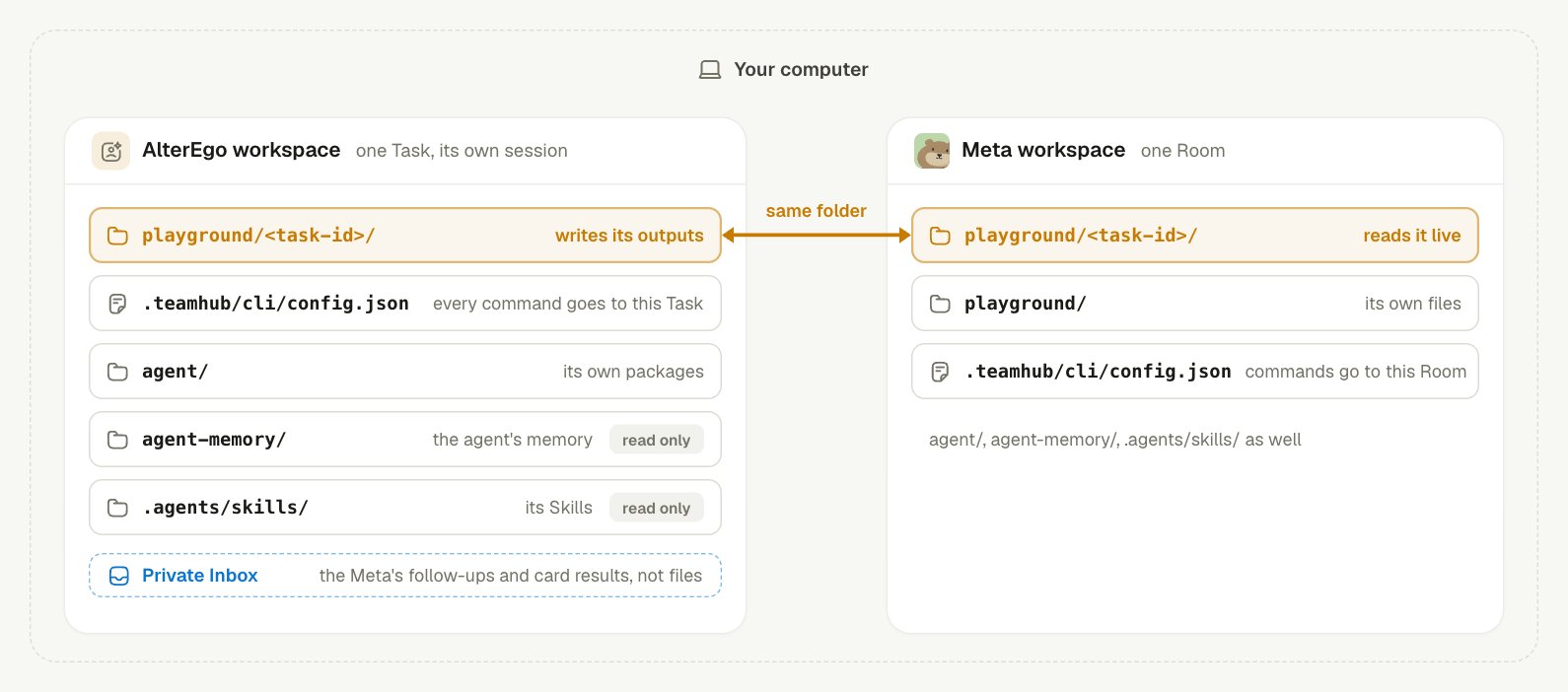
The AlterEgo shares one folder with the Meta; the rest of its workspace is its own.
teamhub command that the AlterEgo runs goes to its own Task, because .teamhub/cli/config.json in its workspace names that Task. Follow-ups from the Meta and the answers to its approval cards reach it through a private Inbox, not through files.
Agent memory learns from the Meta’s conversation. A report enters that conversation, so what a report says can become memory. The steps inside a Task do not.
How does the agent keep you posted on a long Task?
Linger watches the quiet time between reports. A report wakes the Meta as soon as a turn ends, but one turn can run for a long while, and the chat would hear nothing.- Linger notices the silence. A Task of this Room is running or waiting for an approval, and the agent has said nothing in the Room for 10 minutes.
- Linger reminds the Meta in private. The reminder lists each Task with how long it has run, when it last reported, any approvals it waits for, and its latest step.
- The Meta decides. When something is worth telling you, it checks the Task with
teamhub task checkand posts one short update in its own words. When nothing that matters has changed, it says nothing.
How does a new request reach a running Task?
You tell the Meta, and the Meta passes your request to the same Task withteamhub task send. It does not start a second Task for the same work.
When you ask how a Task is going, the Meta checks it with
teamhub task check and tells you how it really stands. When you ask it to stop, teamhub task stop ends the current turn and keeps the files, so a later request can pick the work up again.
Your answer on an approval card goes straight to the AlterEgo. The Meta does not relay it.
Keep learning
Approvals and permission review
See which actions wait for your card.
Agents, Rooms, and Contexts
See how one agent works in many Rooms.
Agent memory
See what an agent remembers across Rooms.
Build a team with team.md
Split a job across several agents instead of one.