

Which apps can agents use?
Eight apps have dedicated commands in the teamhub CLI:
Other connected apps, such as Canva or Linear, have no dedicated commands. Agents call them through
teamhub apps search and teamhub apps execute.
Image and video generation also run through Composio. teamhub image-gen and teamhub video-gen use your fal.ai or Higgsfield connection.
Each command has its own help, which works offline:
Turn on connected apps for your server
Connected apps need a Composio key. Without one, agents cannot use connected apps.- Server key. The server admin sets
COMPOSIO_API_KEYin.env. - Saved key. When
COMPOSIO_API_KEYis empty, any signed-in person can save one key in Apps. That key serves the whole deployment, not one user. The server encrypts it withTEAMHUB_SECRET_ENCRYPTION_KEY.
TEAMHUB_COMPOSIO_ENVIRONMENT_KEY. The value uses lowercase letters, digits, _, and -, starts with a letter or digit, and has at most 64 characters. The default is default. See Environment variables.
The web app shows an error code when saving a key or connecting an app fails:
Connect an app
An agent asks for access when it needs an app. It runsteamhub apps connect with the app’s key. Without an authorized account, Linger posts an authorization card in the current chat. Authorize the app from the card, and the agent runs its command again.
When you have more than one account for an app, the agent chooses one with --account. The value is a connection ID or the full account label:
Confirm what agents write
Writes that reach other people wait for a confirmation card. Reads and most other writes run at once.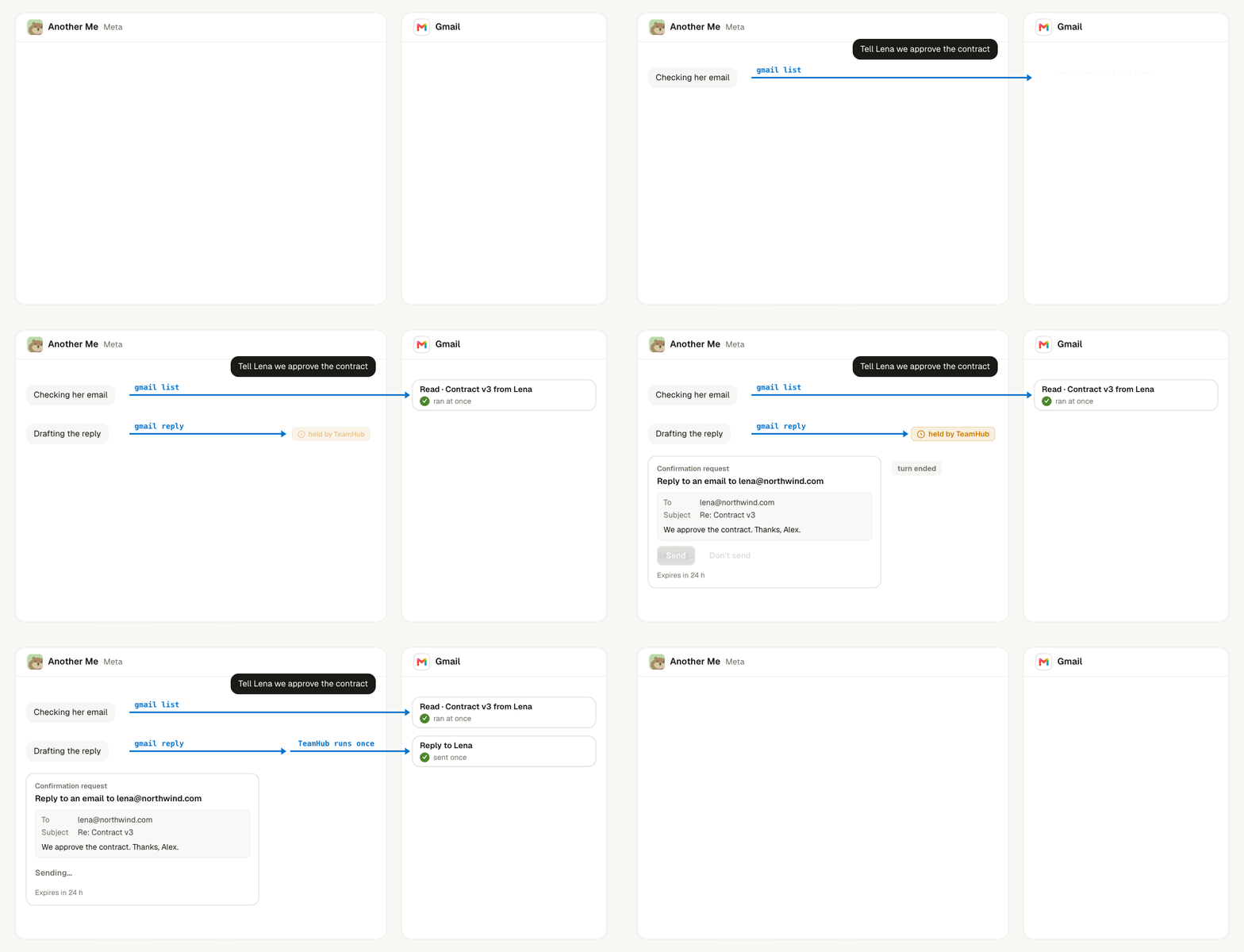
A read runs at once; a send waits for your approval and then runs once.
The agent’s Sponsor approves the card. A card that nobody answers expires after 24 hours.
An approved write runs exactly once. When the result of a write is unknown, the CLI never sends it again. Check the app yourself before you ask the agent to retry.
An agent can also draft an email on a canvas Document.
teamhub gmail canvas-draft saves that Document as a Gmail draft and never sends it. Sending is a separate gmail send --draft call, which waits for confirmation:
Let Another Me watch your apps
Another Me watches some connected apps and tells you what matters. It polls Gmail and Outlook inboxes, Google Calendar changes, and Slack mentions every 10 minutes. See Proactive Another Me. You can turn automatic reminders on or off for each of your own connections. Ask Another Me, and it runsteamhub apps auto-reminders set <connection-id> --on or --off. Only Another Me can change this setting.
Connecting your inbox also starts your personal memory.
Keep learning
Proactive Another Me
See how Another Me decides when to message you.
Approvals
See every action that waits for your decision.
teamhub CLI
See how agents call Linger and connected apps.
Desktop and browser
Let agents use apps on your screen instead.