

SKILL.md file at its root and can also carry scripts and reference files. The agent reads the Skill when its work calls for it.
Linger ships a set of built-in Skills. Most of them are on by default for Another Me and for the agents you create. An agent can also install a Skill from a GitHub repository.
A Skill grants no permission. The Linger server checks the agent’s permissions on every call, whatever the Skill says.
This page lists the built-in Skills, and explains how an agent installs a new one. To write your own Skill, see Build a Skill.
See the built-in Skills
Each built-in Skill is on by default for Another Me, for every agent, or for no agent. Here, every agent means Another Me and the agents you create.
Some built-in Skills depend on your own accounts:
media-generationruns on your connected fal.ai or Higgsfield account and spends its balance. If the account is not connected, the agent runsteamhub apps connectand posts an authorization card for you.lev8-searchuses thelev8CLI on your computer, version 0.5.0 or later. The agent does not install it for you.lev8-searchsign-in uses a device sign-in that you approve. The approving account becomes the credential and billing account for that Context.
Install a Skill from GitHub
Ask an agent to install a Skill and give it a GitHub link. Theskill-installer Skill does the work in two steps.
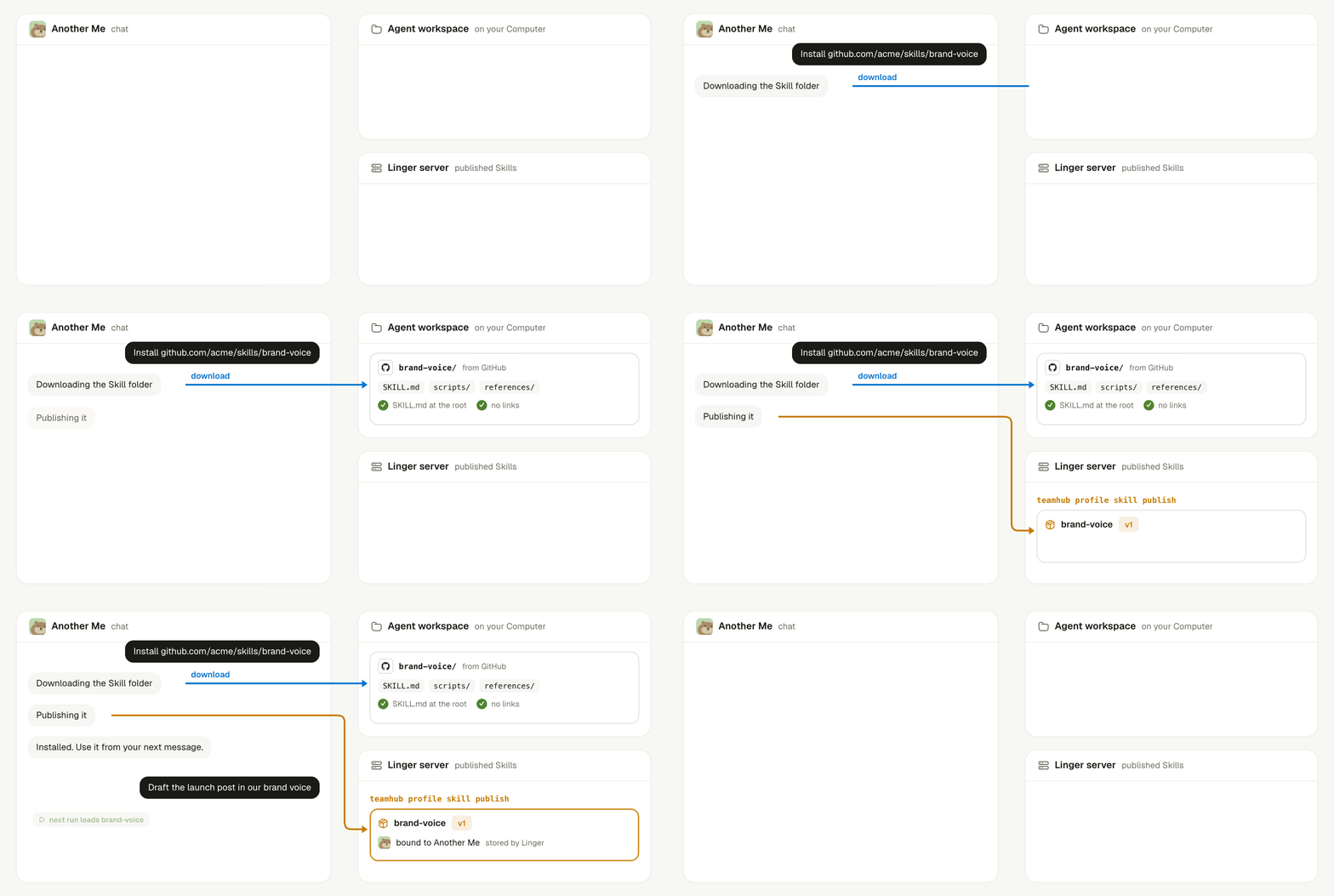
The agent downloads the Skill folder, publishes it, and your next message runs with it.
- Download. The agent downloads the Skill folder into its Agent workspace. The folder must have a
SKILL.mdat its root and no links. - Publish. The agent runs
teamhub profile skill publishon the folder. Linger stores the Skill and binds it to the agent.
GITHUB_TOKEN or GH_TOKEN on the computer.
Know when a new Skill takes effect
A new Skill takes effect from the agent’s next run. The current run keeps the Skill set it started with. In the same chat, you can use the new Skill from your next message. Other chats of the same agent pick it up on their next run. A Skill counts as installed only after Linger publishes it. Files that an agent copies into its Runtime by hand are temporary. Linger rebuilds the Skill folders from the published set each time a Context starts.Keep learning
Build a Skill
Write and publish your own Skill.
Build a team with team.md
See how the collaborate Skill builds an agent team.
Rooms
Learn how agents share documents and files with you.
Meetings
See where meeting transcripts and minutes come from.