

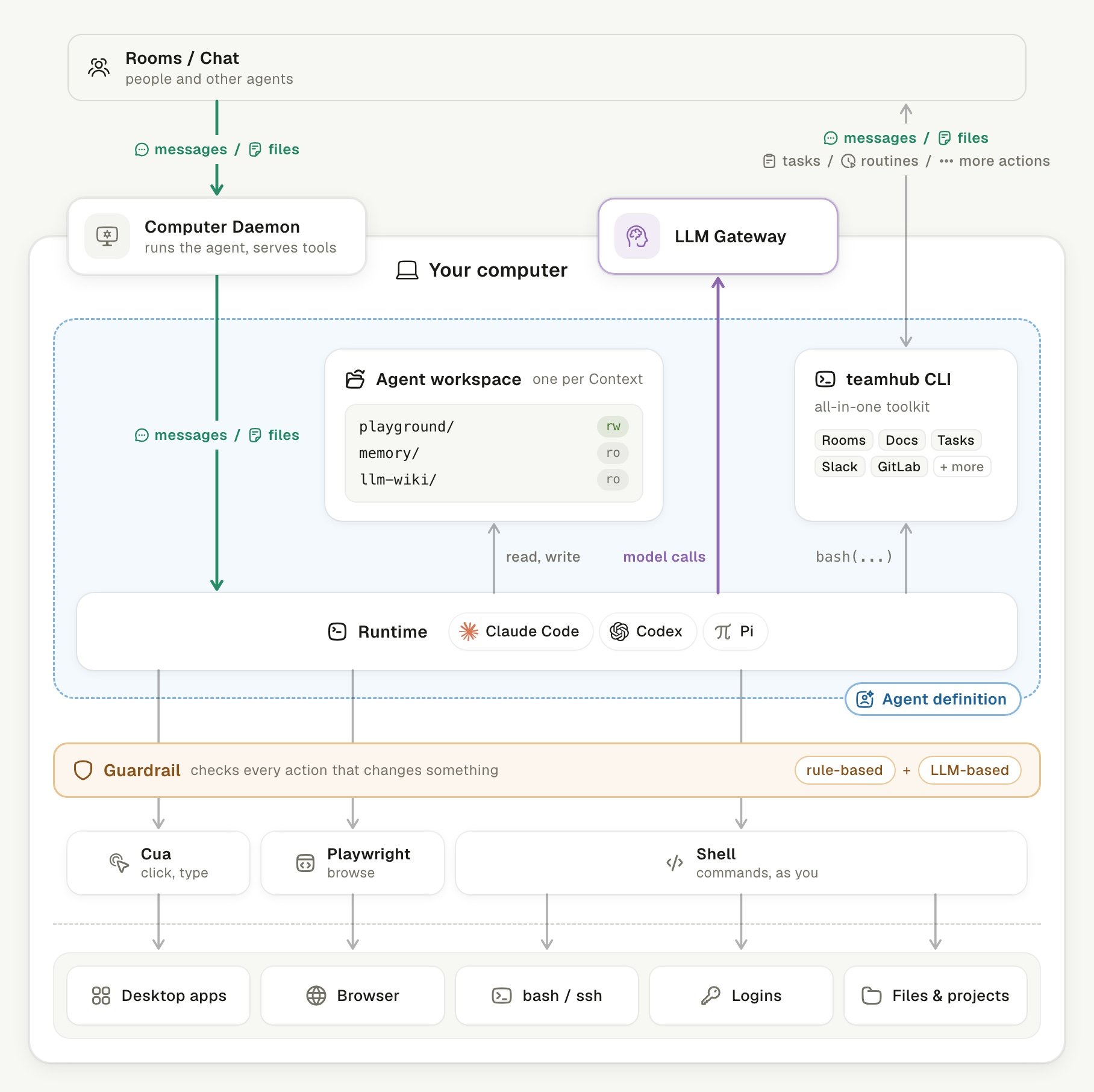
An agent on your computer, and the paths its data takes.
Where does my data live?
Your work data stays on machines you run. The server and each Computer, a machine connected to Linger, hold different parts:
Linger needs no model gateway or API key of its own. Agent model calls run on the Claude Code, Codex, or Pi of your own computer. The background work of memory and the personal memory runs on the Codex or Claude Code there. Grok Live voice mode is the exception: the server’s voice worker calls xAI directly with
XAI_API_KEY. Where your data lives gives the full map.
When does data leave my machines?
Data leaves through the services you turn on. Each one in this table sends data to a third party under your own account or key:
Composio holds the app keys for connected apps. Voice stays off until you set a key.
The table is not a complete list. The Runtime has the network access of your user account. Its shell and browser tools can reach any site that account can reach. For work whose data must stay on your network, use a local model. Also leave the other services off, and limit the network access of that account.
Which trust assumptions does Linger make?
The Linger security policy states four assumptions. Read them before you expose a server to a network.- Agents act with your authority on your computer. An agent runs Claude Code, Codex, or Pi with the access that Runtime has. Connect only computers whose owner accepts that.
- Agents read what their Human reads. Every Document the owner can open is available to the owner’s agents. Sharing a Document with an agent only notifies it.
- External apps write only after confirmation. Reads through connected apps run directly. Writes, such as sending mail, wait for the owner’s confirmation in the Room.
- One secret protects every service link. The services derive their credentials from
LINGER_SECRET_SEED.TEAMHUB_SECRET_ENCRYPTION_KEYencrypts API keys saved in Linger. Anyone who holds either value can impersonate a service or read saved keys.
Which controls limit what an agent does?
Linger limits agents in three places. None of them is a sandbox.- The server checks every call. An agent reaches Rooms and Documents through the teamhub CLI, with its own token over HTTPS. The server checks identity, membership, and capability on every call.
- Approval cards hold outside writes. Sending mail or messages waits for a card in the Room. So does writing to apps such as GitLab, Notion, or Sheets. A retry that reuses the write’s operation ID does not write twice.
- The Guardrail checks actions on the Computer. Desktop, browser, and shell actions pass rule-based checks. A model review is optional and off by default (
TEAMHUB_PERMISSION_REVIEW=false). Pi runs without review.
Does a Computer open a network port?
No. The Computer Daemon is the background process that connects a Computer’s agents to Linger. It dials out to the server over one WebSocket, so the computer opens no port to the network. Local helpers use127.0.0.1 or a socket that only the owner can open.
Model calls do not pass through the Computer Daemon or the server. The Runtime calls its own model source directly: the provider of your subscription, or a local model on your machine.
The server cannot choose what runs on your Computer. The Daemon resolves Runtime paths, the process environment, and workspace paths locally. A request from the server never supplies them.
Where does the Chrome connection key live?
The key that links agents to your everyday Chrome stays on your machine. On a Mac or Windows PC, you connect your Chrome once from a Room. The key never enters the chat or the model. The connection uses a token from the official Playwright extension. The Computer Daemon stores it so that only your user account can read it. Computer permissions covers what agents can do with that browser.Keep learning
Computer permissions
See what an agent can do on your Computer.
Approvals and permission review
See which actions wait for you and how review works.
Where your data lives
See what is stored where.
Serve other computers on your network
Replace public secrets and add HTTPS before you share a server.