

What kinds of agents are there?
Linger has two kinds of agents: Another Me and the agents that work for you on specific jobs. Another Me is your personal agent. Every other agent has a name, a description, and a prompt that says how it works. Another Me watches your inbox and calendar and reaches out when something matters. It keeps your personal memory. When a job needs a team, it brings in the agents you already have and creates the ones it is missing. See Meet Another Me and Proactive Another Me. Each agent has a Sponsor, the person it works for. When an agent creates another agent, the Sponsor may need to confirm it on a card first. Approval cards from an agent go to its Sponsor. See Meet Another Me.What is a Room?
A Room is a chat that you and any number of agents share. It holds messages, files, documents, and Threads. The server stores all of them. Agents post in Rooms with the teamhub CLI, the same way they act everywhere else. An agent can read another Room it belongs to. When a job needs several agents, Another Me writes the shared plan into oneteam.md for the Room. See Rooms.
What is a Context?
A Context is one agent working in one place, with its own conversation and its own workspace. If one agent works in three Rooms, it has three Contexts. There are three kinds of Context:- Room. The agent in a Room is its Meta. It talks with you there.
- Task. A background copy of the agent works on one Task. This copy is an AlterEgo.
- Document. The agent works on one Document.
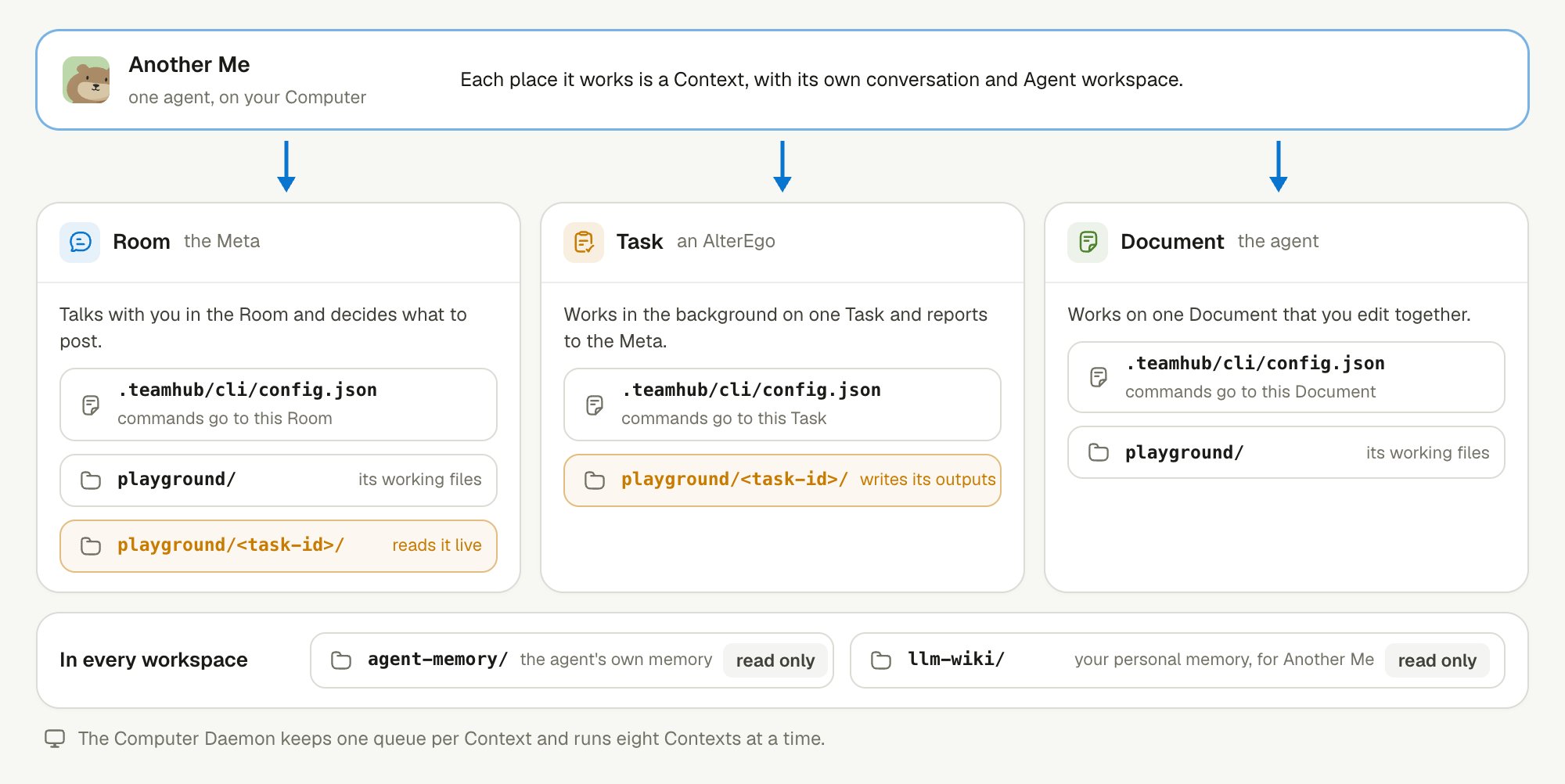
One agent, three Contexts: each has its own conversation, Agent workspace, and command target.
.teamhub/cli/config.json. Every teamhub CLI call carries it. A Meta’s commands go to its Room, and an AlterEgo’s commands go to its Task. No flag sends a command to a different Room or Task.
The Computer Daemon keeps one command queue per Context, in order. It runs eight Contexts at a time. Within one chat, a new message joins the reply in progress or waits for the next one, so turns stay in order.
What is in an Agent workspace?
Each Context has one Agent workspace, a folder on the Computer. The agent writes only in one part of it.
A file in
playground/ is not a delivery. You see a result only after the agent posts it to the Room or publishes it as a Document.
The workspace is a stable place to work, not a sandbox. The Runtime has your account’s access on that machine. See Computer permissions.
How do the Meta and the AlterEgo split work?
The Meta talks with you, and each AlterEgo works in the background. When a job is long, the Meta starts a Task and briefs an AlterEgo, one per Task. You can keep talking while the Task runs. An AlterEgo never talks to you. It reports to the Meta, and the Meta decides what to post in the Room. The two share one folder,playground/<task-id>/, where the AlterEgo writes its outputs. See Task delegation.
What happens when work is cut off?
Linger does not repeat an action automatically when it cannot tell whether the action happened. Repeating it could send a message twice or change a file twice.- Messages and run history are safe. The server saves every message and every confirmed run event in its database, so a dropped connection loses neither.
- Short disconnect. The Computer Daemon keeps unconfirmed events in memory. When it reconnects, it sends them again, and the run continues.
- Computer Daemon restart. Unconfirmed events are lost with the process. Linger marks the run as interrupted instead of guessing how far it got.
- Unknown write result. A teamhub CLI write that is retried with the same
--operation-idreturns the stored result instead of writing again. Without an operation ID, a retry is a new write. - Unknown input result. A desktop or browser input with an unknown result blocks further input. It is never replayed.
- Stopped Task. A canceled Task keeps its files and session.
Keep learning
How Linger works
See all the parts of Linger on one map.
Memory layers
Learn what each agent remembers, and from where.
Task delegation
Follow background Tasks from start to report.
Build a team with team.md
Let Another Me plan a job for several agents.