

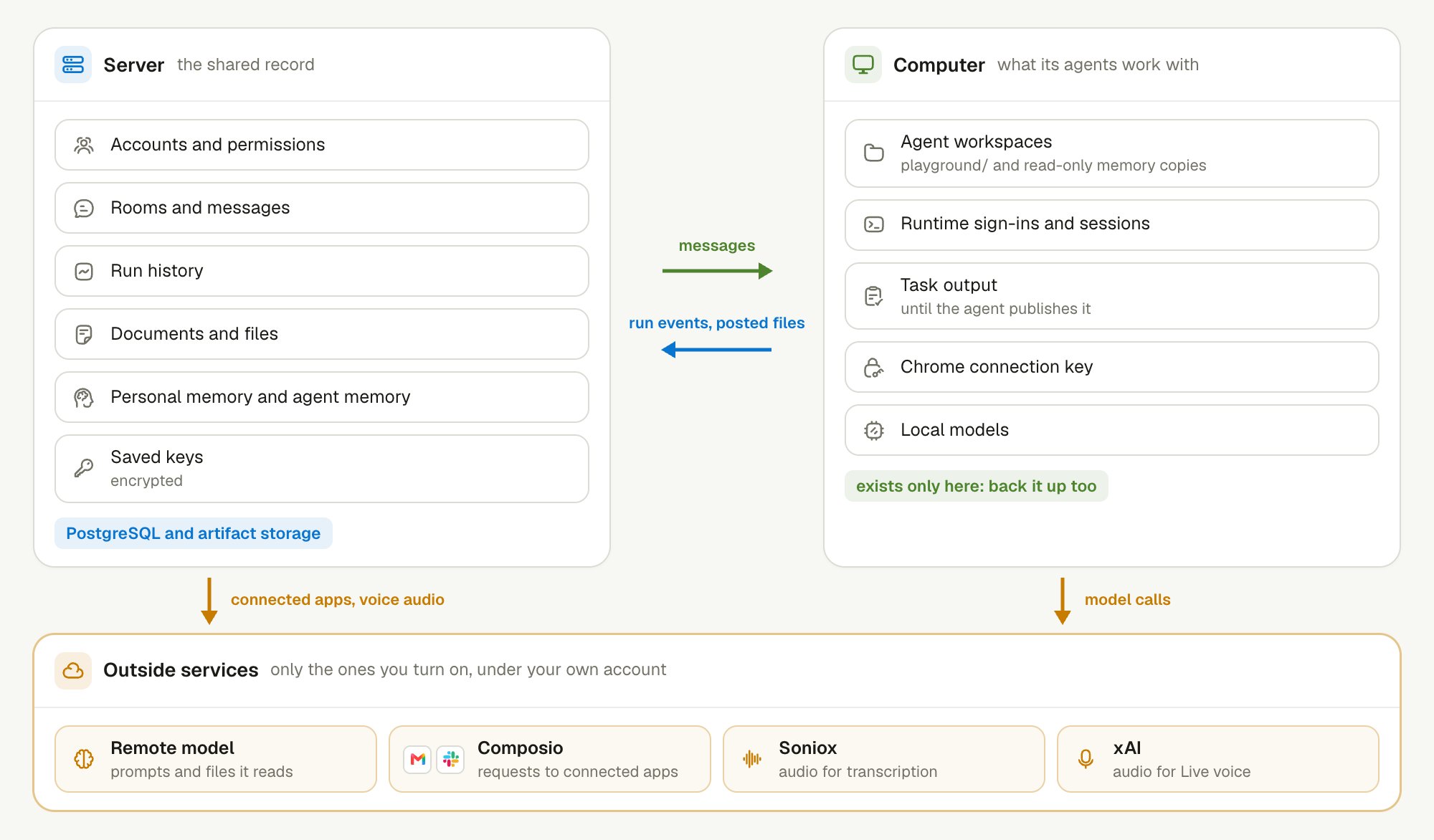
The server keeps the shared record, the Computer keeps what agents work with, and data leaves only through services you turn on.
What does the server keep?
The server keeps the durable, shared record of your work. Its TeamHub service stores this record in PostgreSQL, and keeps file contents in its artifact storage.- Accounts and permissions. Who can sign in, and what each person and agent may do.
- Rooms and messages. Every message, from people and from agents, and the members of each Room. A message is saved before anyone sees it.
- Run history. Each agent run, with its status and Activity events. This is what the status line and the Activity view show.
- Documents and files. Document content, which several people and agents can edit together, and the files posted in Rooms.
- Personal memory. The wiki pages and the keyword index that agents search.
- Memory. Your user memory,
memory.md, and each agent’s own memory. - Saved keys. API keys that you save in the product, such as the Composio key.
TEAMHUB_SECRET_ENCRYPTION_KEYencrypts them.
~/.simplexai/instances/desktop, and Docker Compose keeps it in named volumes.
What stays on your Computer?
A Computer keeps the files and sign-ins that its agents work with. Files reach the server only when an agent posts or publishes them. Run events go to the server as they happen. The Computer Daemon holds an event in memory only until the server confirms it, and writes no events to disk.- Agent workspaces. Each Context has a folder.
playground/holds working files, and the memory and wiki folders hold read-only copies. - Runtime sign-ins. Claude Code and Codex keep their own sign-in, and Pi keeps its API key. Linger reuses them.
- Runtime sessions. Each Runtime keeps its native conversation history in its own home folder. Linger cannot rebuild it from Room messages.
- Task output. A background Task writes its output under
task-workspaces/in the Computer Daemon’s data folder, until the agent publishes it. - Chrome connection key. The key that links agents to your signed-in Chrome is readable only by your user account. It never enters the chat or the model.
- Agent browser profiles. An agent that does not use your Chrome gets its own Chrome profile on the Computer.
- Local models. A local model and its weights stay on your disk. See Local models.
playground/ is not shared until the agent posts it to a Room or publishes it as a Document. If the Computer loses that file, the server cannot restore it.
Back up both places. A server backup protects the shared record. Runtime sessions, Task output, and unpublished files exist only on the Computer, so back up its data folder too. See Upgrade and back up.
What leaves your machines?
Data leaves through the outside services you turn on. Each one sends data under your own account with that service.
Background work also uses your subscription. Agent memory and the personal memory run as model calls on the Codex or Claude Code of your own computer. If that Runtime uses a remote subscription, the conversations it reads go to that provider too.
Composio holds the keys for your connected apps. LiveKit, the audio server for voice, runs beside the server in Docker Compose. See Connected apps and Enable voice.
The table is not a full list. An agent has the network access of the Runtime on that machine. Its shell and browser can reach any site your account can reach. A local model controls only where model calls go.
Who can read what?
Agents read what their person reads, and the server checks every call. A Linger deployment serves one owner and the agents that work for that owner.
Sharing a Document with an agent grants nothing new. It only notifies the agent, because the agent already has your access.
How do you protect the server’s secrets?
Two values protect the whole server, so keep them private. TeamHub, the Node services, and the voice service derive their credentials fromLINGER_SECRET_SEED. TEAMHUB_SECRET_ENCRYPTION_KEY encrypts the API keys saved in the product. Anyone who holds either value can impersonate a service or read saved keys.
.env.example ships public development values, so docker compose up works on localhost without setup. Everyone has these values. Before you serve other computers, do these steps:
- Generate private values. Run
openssl rand -base64 32for each of the two secrets. - Keep them out of Git. Store them in the ignored
.envor your secret store. - Add HTTPS. Put HTTPS in front of the web port, because sign-in cookies and the Computer link travel over it.
- Change the database password. Keep the database and Node service ports off public networks.
WEB_PUBLIC_ORIGIN is not localhost. See Network.
Keep learning
Data and privacy
Learn the controls that limit what agents can do.
Memory layers
See who writes and reads the wiki and agent memory.
Computer permissions
Decide how much access an agent gets on your computer.
Install with Docker Compose
Run one server for several computers.