

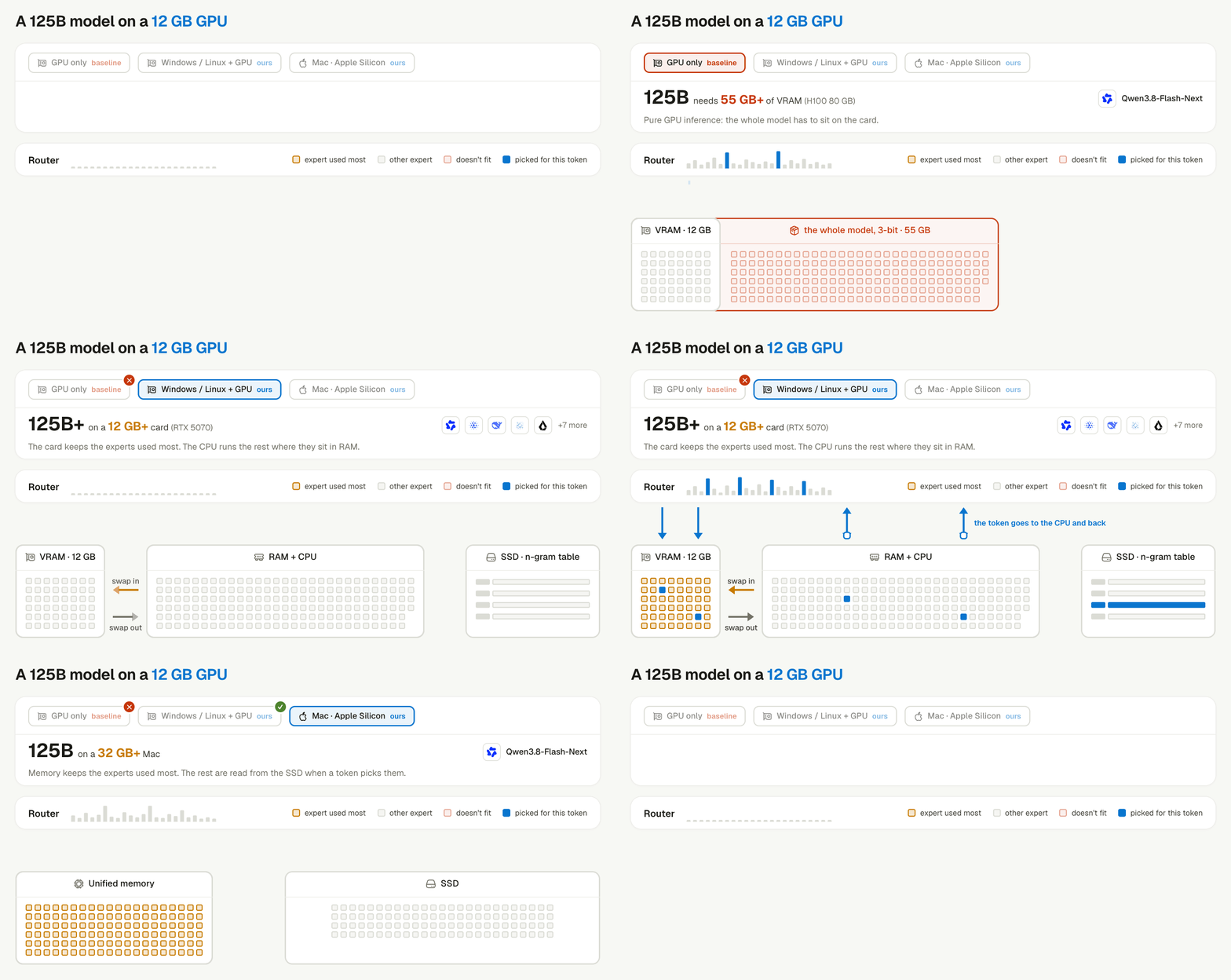
PolyStrata keeps the most-used experts next to the GPU.
How does the planner pick settings for my machine?
The planner chooses the hardware use and the model settings together. Layer by layer, your platform, free memory, and bandwidth narrow the catalog. At the end, one model remains, with one quantization, context window, and KV (key-value) cache precision. The planner then packs the smaller models around it. These terms appear in the table below.- Quant is the quantization of the model weights. A smaller quantization uses less memory.
- Context is the context window, in tokens.
- KV is the precision of the key-value cache.
- Multi-token prediction (MTP) lets the model draft a few tokens that one full pass checks.
Every row is the planner’s own output for that machine. When it must choose, the planner prefers quality over speed. That is why a 32 GB Mac gets a smaller quantization and no MTP. On a Mac, MTP and the prompt cache stay off.
Which machines does the planner refuse?
The planner refuses small machines instead of squeezing a model onto them.- NVIDIA cards with 16 GB of memory or less.
- Macs with 24 GB of memory or less.
How do I approve and install the plan?
The planner proposes a plan, and nothing deploys until you approve it. The installer offers local models that fit your machine. It asks before it downloads anything, and model deployment needs its own approval. After you approve the plan, Linger tests each model. A model counts as installed only after it answers a real question. You can also run the local model stack yourself from a checkout of the repository.scripts\installs\stack.ps1 with the same arguments. The apply command needs the full confirmation ID that plan prints. The scripts never plan or install on their own. The first run downloads a pinned toolkit and checks its SHA-256 checksum. Later runs start offline.
How does PolyStrata fit a large model into limited memory?
PolyStrata keeps the most-used parts of the model next to the GPU and moves the rest one level away. This works because of how a mixture-of-experts (MoE) model computes. An MoE model holds many sub-networks called experts, and each token uses only a few of them. PolyStrata keeps the most-used experts next to the GPU. The rest wait one level further away.- On an NVIDIA PC, CUDA memory holds the most-used experts. The CPU (central processing unit) computes the rest from system RAM (random-access memory) at the same time.
- On an Apple Silicon Mac, unified memory holds the model when it fits. When memory runs out, the SSD (solid-state drive) serves the rest, and the engine reads the next layer ahead.
Keep learning
Model scheduling
See how agents, approvals, and background work share one local model.
Install the desktop app
Install Linger and choose local models during setup.
Data and privacy
Check what stays on your machine and what leaves it.