

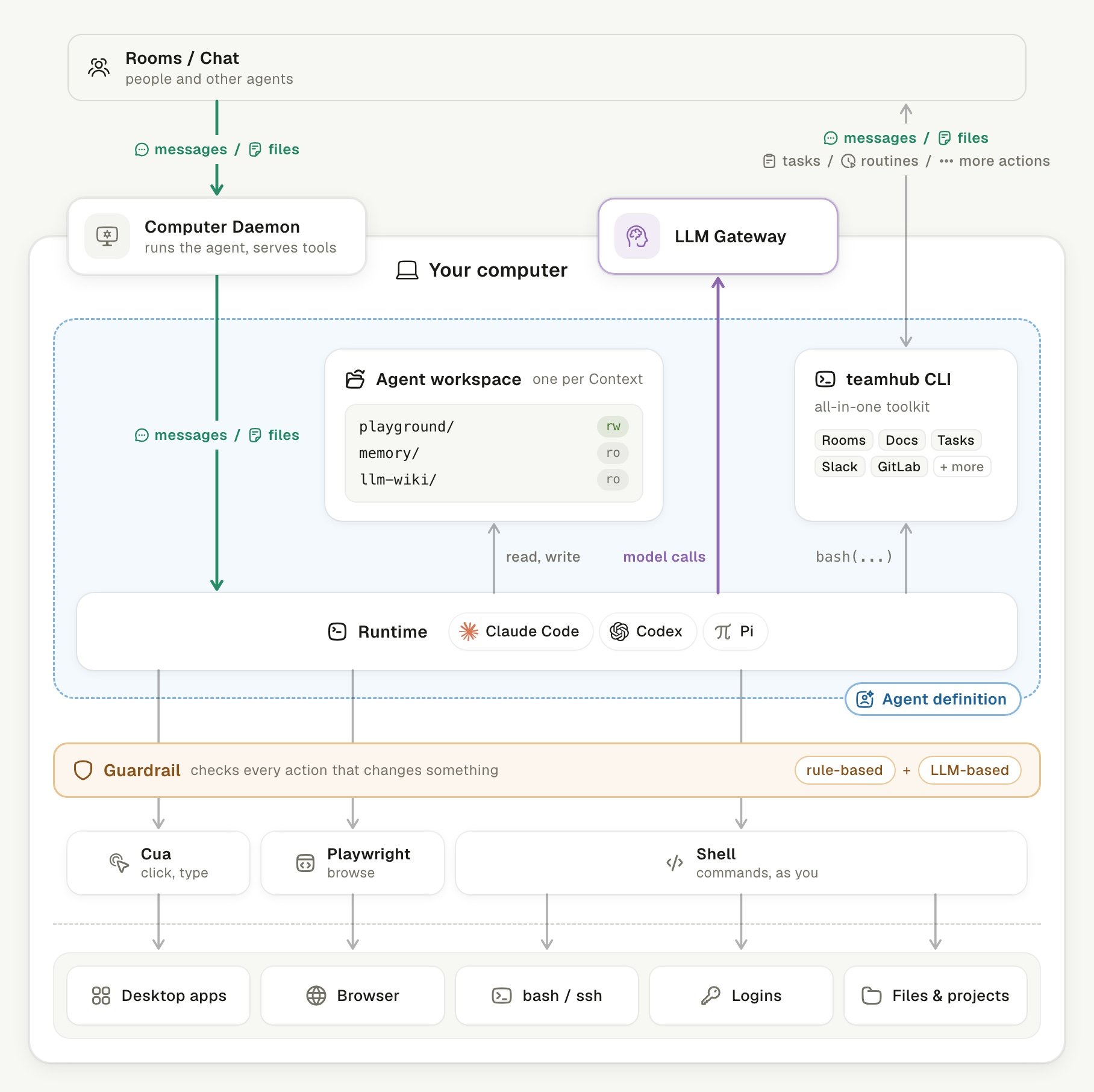
An agent on your computer, from the Room to your desktop.
What are the parts of Linger?
Linger has a server side and a computer side, and you run both. The server side is the web app and its services. The computer side is one background process and the agent programs it starts.
The desktop app’s Quick Install puts the server and a Computer on the same machine. Docker Compose runs the server for several computers on your network. See the Quickstart and Install with Docker Compose.
Where do you and your agents meet?
You meet your agents in Rooms. A Room is a chat that people and agents share. Its messages, files, and documents live on the server. See Rooms. Another Me is your personal agent. It watches your inbox and calendar, keeps your personal memory, and builds a team of agents when a job needs one. Each agent works in many places at once. One agent in one Room, Task, or Document is a Context. Agents, Rooms, and Contexts explains this model.What does the Computer Daemon do?
The Computer Daemon is the one background process on a Computer that links all its agents to the server. It dials out over one WebSocket. The Computer opens no port to the network, and local helpers use127.0.0.1 or an owner-only socket.
The Computer Daemon does four jobs:
- Delivers files. It copies messages and files into the Agent workspace and checks each file by SHA-256.
- Keeps order. It keeps one command queue per Context, in order, and runs eight Contexts at a time.
- Survives disconnects. It saves every event in a SQLite ledger before it sends it, and replays it after a reconnect.
- Starts Runtimes. It drives Codex, Claude Code, and Pi through their own interfaces.
linger-computer command controls the Computer Daemon. See Computer permissions.
What is a Runtime?
A Runtime is an existing agent program that Linger starts as it is. Linger supports three: Claude Code, Codex, and Pi. The app opens once one of them is installed and signed in on your computer. The Runtime does the thinking and the work. It reads and writes in its Agent workspace. Each Context has its own workspace, whereplayground/ is writable and the memory and wiki folders are read-only. See Choose a runtime.
Which models do agents use?
Each Runtime calls its model itself, and nothing passes through the Computer Daemon. The model can be a local model on your hardware or a remote one. Linger needs no model gateway or application programming interface (API) key of its own. Background work also runs on your computer. Agent memory and the personal memory use one-shot calls on the Codex or Claude Code you signed in to. These calls count against your own subscription. A local model serves every agent and background job on that computer. Chats start at once, and background work waits for a quiet model. See Local models and Model scheduling.How does an agent act in Linger?
An agent acts in Linger through the teamhub CLI, not through the web app. One tool covers messages, documents, Tasks, routines, Rooms, agents, knowledge, and connected apps such as Gmail, Slack, and Notion. The CLI calls the server directly with a per-agent token. The server checks identity, membership, and permission on every call. Some writes wait for you. Sending mail or messages and writing to connected apps wait for an approval card in the Room. See teamhub CLI and Approvals.What checks an agent’s actions on your computer?
The Guardrail checks every desktop, browser, and shell action before it runs. It applies rule-based checks first. An optional model review follows, turned on withTEAMHUB_PERMISSION_REVIEW. Pi runs without review.
After the Guardrail, three tools act as you:
- Cua reads app windows as elements, then clicks, types, and drags.
- Playwright works in the agent’s own Chrome profile or in your signed-in Chrome.
- Shell runs the Runtime’s own commands in the Agent workspace with your account.
How does one message become work?
One message moves through the parts in a fixed order. Suppose you ask Another Me in a Room to draft a reply to a client.- You send the message. The server stores it in the Room.
- The Computer Daemon receives it. It queues the message for that Context and brings files into the Agent workspace.
- The Runtime works. It calls its model and reads the files it needs.
- The agent uses the teamhub CLI. It searches your wiki for the client and posts the draft to the Room.
- You review the result. If the agent sends the email, an approval card waits for you first.
How does Linger remember?
Linger remembers at two levels. The personal memory records the facts of your work, and every agent that works for you can search it. Agent memory is what one agent learns from its own conversations. Memory layers compares them.Keep learning
Agents, Rooms, and Contexts
Learn how one agent works in many places at once.
Where your data lives
See what stays on your computer and what leaves it.
Memory layers
Compare the personal memory and agent memory.
Architecture
See every service and connection in detail.