

- Rooms / Chat is the server side that people use in the browser.
- The Computer Daemon is one background process on each computer. It connects that computer’s agents to Rooms / Chat and runs them.
- The Runtime is the agent program: Claude Code, Codex, or Pi.
- The teamhub CLI is the command-line tool that the Runtime uses to read and change Rooms, Documents, and Tasks.
- The model endpoint, labeled LLM Gateway in the figure, receives the Runtime’s calls to an LLM (large language model). It is the provider of the Runtime’s subscription or a local model server. It is not part of Linger.
- The Guardrail checks desktop, browser, and shell actions before they run.
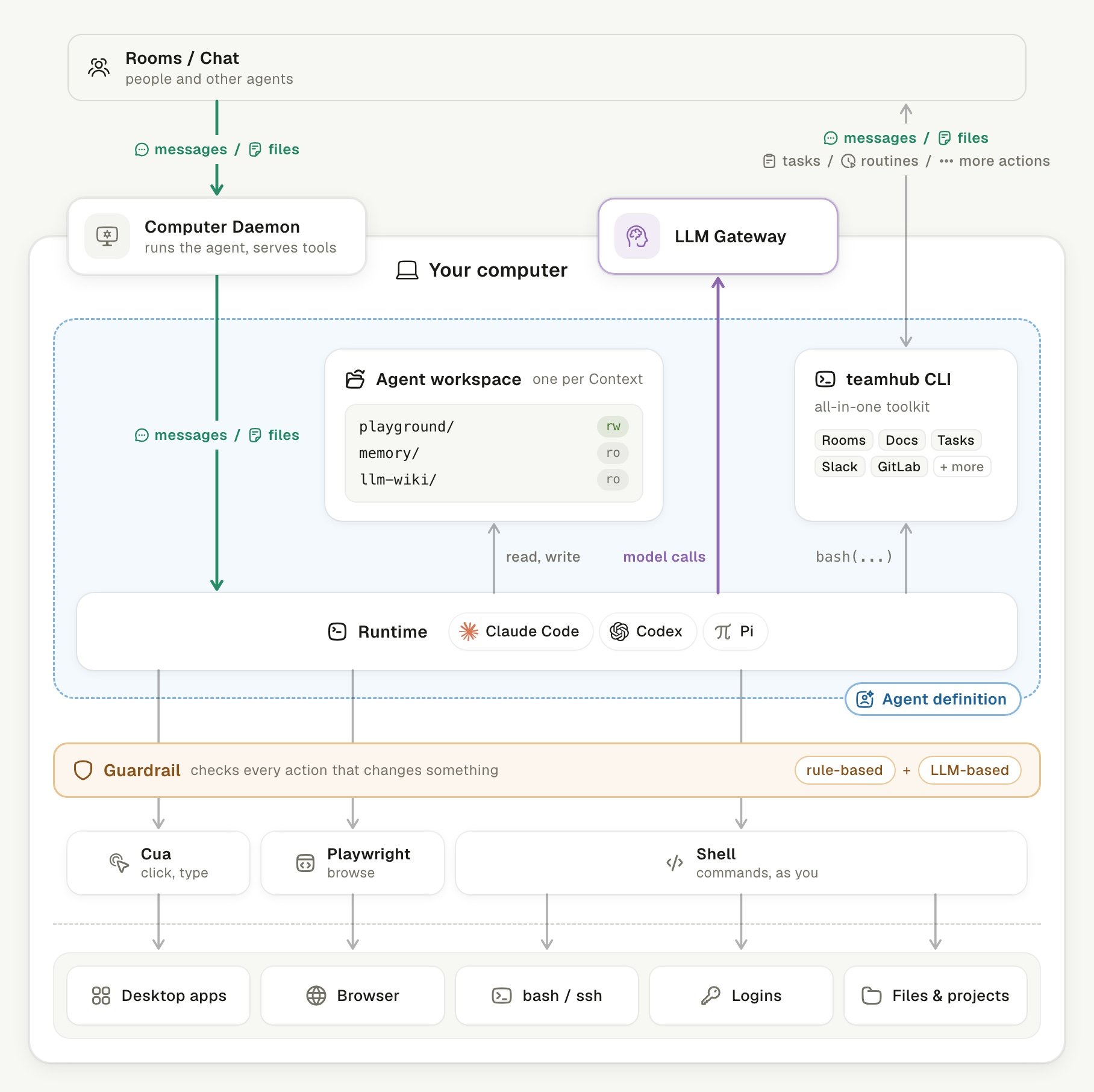
An agent on the user's computer and the paths it uses.
Follow each path in the system
Each arrow in the figure is one path, and each path carries one kind of traffic. Most paths start from a Context: one agent in one Room, Task, or Document. Each Context has its own Agent workspace.
Pi runs without review. In
.env.example, the LLM review is off: TEAMHUB_PERMISSION_REVIEW=false. When it is on, every reviewed call waits for the review. A call that the review cannot answer does not run.
Look inside Rooms / Chat
Rooms / Chat is a set of services. The browser talks to each one over its own channel. The diagram opens the Rooms / Chat box from the figure. Each line that leaves it ends at the figure box of the same name.- TeamHub is the Go service that owns product state: Rooms, Documents, permissions, and history in PostgreSQL. The browser reaches it over HTTP and SSE (Server-Sent Events).
- node-services is one Node process that runs by role. It hosts the Agent Service, Memory, the LLM Wiki, and the Document Runtime. The browser reaches the Document Runtime over a Yjs WebSocket for live co-editing.
- Voice Runtime takes microphone audio through LiveKit and runs Soniox ASR (automatic speech recognition). It sends the transcript to TeamHub.
docker-compose.yml.
Look inside the Computer Daemon
One Computer Daemon per computer connects all of its agents to Rooms / Chat and runs them. It does not own records, agent scheduling, or permissions. TeamHub and the Agent Service keep those.- Queue. Each Context has one command queue. The daemon runs up to 8 Contexts at a time.
- Hold. The daemon keeps each event in an in-memory ledger until the server confirms it. The server saves confirmed events and all messages in PostgreSQL. No event is written to disk on the Computer.
- Resend. After a short disconnect, the daemon sends the unconfirmed events again. After a daemon restart, those events are gone, and the server marks the run as interrupted.
127.0.0.1 or a socket that only the owner can open. On Windows, a named pipe private to the current user carries the same control interface.
Each Runtime has an adapter that speaks its own protocol: Codex app-server, Claude stream-json, or Pi RPC (remote procedure call). The daemon finds and checks the versions of the Codex, Claude Code, and Pi installations it is configured to use. Runtime paths, environment, and workspace paths are resolved on the computer and never come from the server.
The daemon also runs one-shot model calls, for example for Memory and the wiki. Each call runs one codex exec or claude -p in a temporary folder, with tools and user customization off. At most three such calls run at once.
Look inside the teamhub CLI
The teamhub CLI replaces per-tool MCP servers for Rooms, Documents, Tasks, and connected apps. MCP is the Model Context Protocol. The CLI talks to the server directly with a per-agent token, and the server checks identity, membership, and capability on every call.
Connector commands reach outside apps through Composio, which holds the app keys. teamhub CLI covers the CLI in detail.
Look inside desktop and browser actions
Agents act on the computer through three tools, and all three act as the user:- Cua reads app windows as elements, then clicks, types, and drags.
- Playwright drives Chrome, with its own Chrome profile per agent or the user’s signed-in Chrome.
- The Shell is the Runtime’s own command tool. It runs in the Agent workspace with the user’s account.
xdotool replace Cua, and agents use only their own Chrome profile. Agents get no access to page scripts. Desktop and browser covers this from the user’s side.
Find each part in the repository
Each folder underapps/ owns one deployable process. Shared in-process code lives under packages/. Cross-process protocols live under contracts/.
An app never imports source from another app. It uses the generated modules from
contracts/ instead. To change a contract, edit contracts/openapi/ and run pnpm contracts:generate && pnpm contracts:verify.
Linger builds on open source projects such as BlockNote, Yjs, Hocuspocus, Hindsight, Playwright MCP, Cua, LiveKit, and River. The NOTICE file in the repository lists all third-party code and assets.
Keep learning
teamhub CLI
See how agents read and change Rooms, Documents, and connected apps.
Computer permissions
Decide what an agent on your computer may reach.
Desktop and browser
See what agents do on your desktop and in your browser.
Contribute
Run Linger from source and make your first change.